
Cmd Switch
Switch input sources instantly with a single Command key press
Support with JPYC
If you'd like to support this project, you can send JPYC using the options below.
Recent Transactions
Showing recent 5 transactions
Cmd Switch is a lightweight macOS menu bar app that lets you switch between keyboard input sources (like English and Japanese) by simply pressing the left or right Command key alone. No complicated shortcuts, no memorizing key combinations—just one key press.
Features
⚡ Lightning Fast
Switch input sources instantly with a single key press
⌨️ Customizable
Assign different input sources to left and right Command keys
🎯 Simple
Works seamlessly without interfering with normal keyboard shortcuts
Installation
RecommendedHomebrew
The easiest way to install CmdSwitch is via Homebrew:
brew install --cask dongri/tap/cmd-switchDownload DMG
Download the latest release from GitHub Releases:
- 1Download CmdSwitch.dmg
- 2Open the DMG file
- 3Drag Cmd Switch.app to Applications folder
- 4Double-click to launch! ✨
Note: CmdSwitch is signed and notarized by Apple, so it will launch without any security warnings.
⚠️ Important: Cmd Switch requires Accessibility permissions to monitor keyboard events. This is necessary for detecting Command key presses.
How to Use
- 1Click the ⌘ icon in your menu bar
- 2Select input sources for Left Command and Right Command
- 3Press the left Command key alone to switch to your left Command input source
- 4Press the right Command key alone to switch to your right Command input source
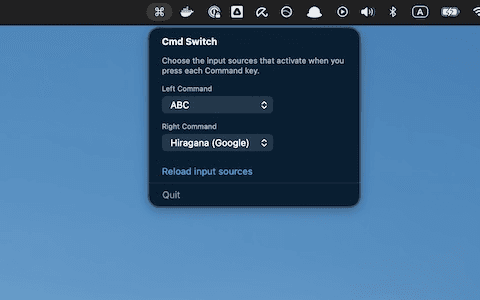
Note: Normal Command key shortcuts (like Cmd+C, Cmd+V) continue to work as usual. Cmd Switch only activates when you press a Command key by itself.
Perfect For
- ✅ Bilingual users switching between languages
- ✅ Developers who use multiple keyboard layouts
- ✅ Anyone tired of complex keyboard shortcuts
- ✅ Power users looking for efficiency
Open Source
Cmd Switch is free and open source software. View the source code, report issues, or contribute on GitHub:
View on GitHub →Licensed under [MIT License]. Contributions are welcome!
Contact
If you have any questions or feedback, please contact us at:
[email protected]